
Simple JFET Preamp for an iDevice Guitar Interface
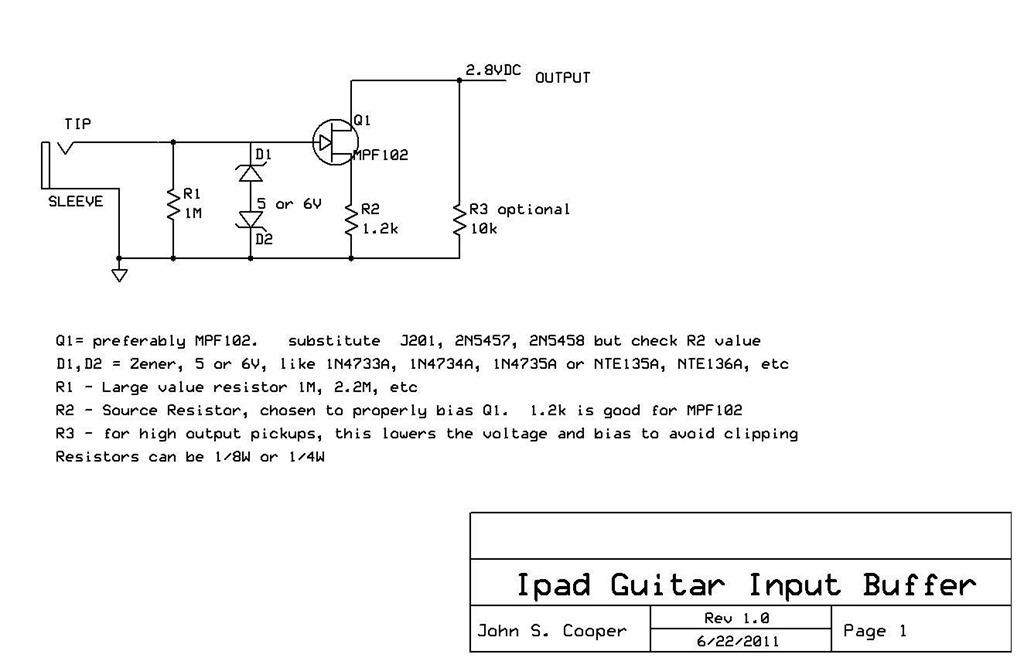
Following up on Part 1, it’s time now to get into the heart of the project:
In this video, I talk about how JFET’s work, then work up a circuit diagram (as shown at right).
Then, I prototype the circuit on the breadboard of my Radioshack Electronics Learning Lab Model 28-280, and finally play through the circuit to show how it sounds.
In Part 3, I’ll demonstrate how to assemble the circuit so that it fits entirely inside the jack.
Here are some useful resources and background reading:
- Great interactive simulation of a JFET
Some articles on JFET preamps:
- http://www.rason.org/Projects/jfetamp/jfetamp.htm
- http://www.hawestv.com/amp_projects/fet_preamp/fetpreamp1.htm
Tillman’s FET preamp using the J201:
Some relevant forum topics:
- http://forum.harmonicdog.com/viewtopic.php?f=2&t=6&start=50
- http://www.diystompboxes.com/smfforum/index.php?topic=85913.0
- http://sgitornado.altervista.org/diyirig.html
September 23, 2011 @ 8:14 pm
September 23, 2011 @ 9:11 pm
September 23, 2011 @ 10:09 pm
September 23, 2011 @ 11:08 pm
Assembling the iDevice Guitar Interface - Planet Z
September 24, 2011 @ 9:01 pm
[…] Here’s the exciting conclusion to the series, following up the intro in Part 1, and the electronics course in Part 2. […]
September 27, 2011 @ 12:02 pm
Hi, i try to build this buf, there aren’t any jfet except 2n5457. R2 must be near 10-30k. Thanks for Schematics.
U can dont damage you 3.5 4pin – 3rca cable. Use rca female-buf-6.3mm male cable.
September 27, 2011 @ 2:15 pm
Hi Dmitry,
Thanks for the source-resistor value suggestion for 2N5457- glad that worked well!
Yes, if you don’t want to cut the ends off an existing cable, using female->male adapters is a good idea.
-John
November 10, 2015 @ 4:32 am
HI JOHN I WAS CONVINCED BY YOUR VIDEO TO BUILD MY OWN IRIG,INSTEAD OF ORDERING IT.MY WORRIES IS,ITS HARD TO FIND THOSE JFET HERE.AND I JUST FOUND ONE KIND,THE “J109” CAN THIS THING WORK?AND WHAT RESISTOR AND DIODE SHOULD I USE?THANKS A LOT
November 10, 2015 @ 5:05 am
I CHECKED ALSO THEY HAVE J112,BF56B.CAN YOU PLEASE MATCH A RESISTOR AND DIODE FOR THIS JFET.THANK YOU SO MUCH
November 10, 2015 @ 8:44 am
Those parts you listed look like switches, not amplifiers.
You need to look at the data sheets, and find something comparable to the jfet amplifier parts listed here.
Good luck!
-John
November 8, 2011 @ 2:47 pm
thanks again
November 8, 2011 @ 2:50 pm
November 8, 2011 @ 4:37 pm
May 22, 2020 @ 4:14 pm
I’m using a IRFZ46N with the 1.2K resistor and the sounds arrives kinda distorted to the mic. Should I increase the resistor value?
May 22, 2020 @ 7:59 pm
Not sure. Sounds like you’ll need to do some experiments. Use bread board or alligator clips to easily try different resistor values.
Good luck!
-John
December 4, 2011 @ 2:17 pm
December 10, 2011 @ 9:00 am
December 13, 2011 @ 10:01 am
December 10, 2011 @ 9:15 am
December 13, 2011 @ 10:08 am
January 3, 2012 @ 4:20 am
Thank you for these great tutorials, you’re a born teacher (high praise in my book). I built the active guitar lead into a Neutrik SilentPlug (http://www2.neutrik.com/uk/en/audio/204_826925229/silentPLUG_productlist.aspx), these are great in case you don’t know them, they have a sleeve which operates a reed switch by magnet to short out the input when withdrawn. This is particularly useful when you’ve increased the input impedance to 3 megohm, you can safely move the lead from one guitar to another without muting the amp, no more high level splats! Has anyone found a good source resistor for the J201? These are slightly lower noise and easier to find in England.
January 3, 2012 @ 5:08 pm
Hi John,
Thanks for the message.
Yes, those silent plugs are great. I made a bunch of cables for all my guitarist friends- silentplug on one end to avoid pops when changing guitars. Pricey connectors (around US$8). but totally worth it.
Cool that you fit a preamp inside one! 🙂
-John
January 3, 2012 @ 4:24 am
Addendum.
Sorry, hit send too soon! I’ll now build the iPad interface and wanted to use your circuit with the J201, it was for this 2.8v circuit that I was looking for the correct source resistor.
January 3, 2012 @ 5:05 pm
For the J201, start with a 1.2K ohm source resistor. See how that works!
-John
February 8, 2012 @ 6:16 pm
March 20, 2012 @ 5:56 am
hi.. i was just wondering on what capacitors to use? my friend told me that capacitors have specs like volts and farrad? sorry, im a little illiterate on circuits and the like.. thank you for the great tutorials..
March 20, 2012 @ 9:40 am
This circuit doesn’t require any capacitors.
The resistors in this circuit can be 1/4W or 1/8W, carbon composition or metal film- doesn’t really matter. See the parts list in part 3 of this series:
https://www.planetz.com/?p=1536
If you’re looking for some general information on caps, you could watch my video here:
https://www.planetz.com/?p=667
-John
March 24, 2012 @ 2:32 am
hi.. i have made a this jack but i would like to ask if i can use this jack and connect to my amplifier instead of speaker? i tried using it but it is grounded.. on my headphones its okay but on my amplifier it sound grounded.. thanks..
March 29, 2012 @ 6:00 pm
It should just work. I use it like that sometimes. I use a 1/8″ stereo mini adapter to dual RCA, then plug an RCA to 1/4″ cable into one side of that, and into my amp. Works fine.
John
March 21, 2012 @ 12:21 am
March 25, 2012 @ 10:38 pm
April 23, 2012 @ 2:19 am
May 13, 2012 @ 1:42 am
May 13, 2012 @ 9:12 pm
May 19, 2012 @ 12:29 am
May 24, 2012 @ 4:53 pm
May 24, 2012 @ 5:12 am
Hi John,
I made one of this and works fine, or almost. A strange thing happens.
Ampkit and amplitube works perfect with no bad sounds on iphone 3,4 and new ipad
GerageBand works perfect on iphone 4 but buzzes on iPad. I don’t know what happens here. Do you have some idea about? Thanks a lot for your work!
May 24, 2012 @ 4:50 pm
That’s strange- I’m not sure what that could be!
June 15, 2012 @ 4:33 pm
Hi!
Does this audio interface works with PC ?
I want to build an audio interface for PC, because if I use the Line-in on my Sound Blaster X-Fi it have a lot of “hiss” noise, I use AmpliTube 3 and Guitar Rig 4.
June 24, 2012 @ 9:05 pm
If your PC has a mic-input, it will probably work. But if you only have a line-in, then it won’t provide the necessary power for the jfet.
-John
September 5, 2012 @ 3:59 am
I do have a Mic input on my sound card, but I don’t use it for my guitar, because it’s too noisy for me.
I still have some “hiss” noise when I use my Line-in.
Can I power externally the JFET ? Maybe from a 9v battery or power adapter with a voltage regulator.
Thanks for your answer in advance!
Daniel
September 5, 2012 @ 10:57 am
Take a look at Tillman’s Preamp cable (as linked in my original post above). He uses a little battery box to power the preamp.
-John
September 6, 2012 @ 2:44 pm
Thanks for your help!
I’m going to build this interface, then I will test with my PC.
September 7, 2012 @ 7:30 pm
I just finished building my interface, and it worked out flawlessly!
As you said, I connected to the Mic input and it worked right away as I plugged in my guitar!
The noise issues is almost gone now, I still hear some noise in the background but it is much, much better than before! Also, the volume and the treble pots are working normally.
I’m going to build a battery box and then test this baby out using the Line-in. 🙂
Thanks for this awesome device! 🙂
September 7, 2012 @ 8:52 pm
Nice! That’s great to hear.
Some amount of noise is normal. This is not an ultra hi-fi connection unfortunately.
Enjoy!
John
June 17, 2012 @ 4:48 am
Hey, do You know if BF256B would work as a replacement for MPF102?
June 18, 2012 @ 3:29 pm
I haven’t tried it, but the datasheet makes it look pretty comparable to the mpf102.
Double-check the pin orientation, I think the drain and gate pins are reversed compared with the mpf102.
John
July 1, 2012 @ 1:35 am
hi.. i would like to make my second cable but my problem is 2N5457 ran out of stock.. can i use 2n5551?
July 1, 2012 @ 10:50 pm
2n5551 is an NPN transistor, not a JFET.
iWey (interface para conectar la guitarra al ipodtouch/iphone/ipad) « nomadaselectronicos
July 25, 2012 @ 4:53 pm
[…] minutos por informacion al respecto, nos dimos cuenta que en http://www.planetz.com (especificamente en https://www.planetz.com/?p=1531 ) esta la mejor informacion que pueden encontrar del […]
August 21, 2012 @ 12:52 pm
Your awesome… Thanks for the info and all, it’s a nice little project.
So I connected the cables without the transistor,resistors an diodes and my michrophone doesn’t work anymore (On my headset ie.) Aparently the input is damaged on my iPhone 4S. Any help would be greatly appreciated, Idk what might have happened and how to check what is what?
Thanks in advance…
August 26, 2012 @ 9:36 pm
I’d suspect a wiring issue with your cable/jacks. You should double check the jack wiring. See part 1 of my video ( https://www.planetz.com/?p=1510 ) where I show how to identify the cable wires with a multimeter, and hook it up with alligator leads…
To rule out the iphone itself:
– Is the built-in iphone microphone working ok?
– Does a standard pair of headphones work?
– Try a cheap wired headset- does that work ok?
-John
August 26, 2012 @ 10:31 pm
My headphones and built in michrophone works, it’s just the mic input on the iPhone that doesn’t work anymore. I’m not sure but I believe the mic input got fried in the process, i don’t know for sure.
I could use my headphones to make calls but now I can’t; I can hear but others can’t hear me. I tried other headphones and eventually resorted to using the built in michrophone on the phone (by removing the headphones) as they didn’t work either.
I’d try the project again but theres no input to work with. Do you know what could have happened and what I can do to possibly solve the problem?
August 27, 2012 @ 3:52 pm
Hi Wayne,
When I was prototyping my circuit, I made lots of mistakes, short circuits, etc, and did not have any problem with damage to the mic input on the ipad. My impression is that it’s a pretty robust circuit – but I suppose it’s possible you damaged yours somehow.
Have you used a multimeter to confirm that you still have 2.8V dc on the mic input? (See part 1 of the video where I show how to do that).
-John
September 11, 2012 @ 1:40 pm
October 9, 2012 @ 5:27 am
First of all, thanks John for the most detailed explanations on the net!
Anyway, amplivibe, I used a BF245b (there’s absolutely no MPF102s, J201s found here in singapore!), but I’m getting quite a bit of distortion still. Could you please share the R2 value you used, so that I have something to start trial and error with?
Much appreciated,
Darren
October 9, 2012 @ 9:08 am
Hi Darren,
You could try installing a trimpot temporarily, in place of R2. That will let you easily experiment until you find a position that works. Then remove it, measure the trimpot resistance with a multimeter, and pick an R2 close to that value.
-John
October 21, 2012 @ 9:29 am
Hi John,
I’ve tried playing with the R2 values using a 2k pot and then a 10k pot, but I still can’t get the bf245b to sound good, what i get is muddy and distorted exactly like an unbiased fuzz.
Could you suggest other replacements for the jFET? Or perhaps the key parameters of the jFET that I should look for in a replacement?
Much appreciated,
Darren
October 21, 2012 @ 9:35 pm
Hi Darren,
I would expect the bf245b to work ok. Are you sure there’s no other problem with your circuit? Are you testing this on a breadboard, so you have plenty of space to experiment, and can easily break down the circuit to the basics and test each step? Do you have another jfet to swap in, in case there’s a problem with your particular bf245b?
-John
July 18, 2013 @ 5:49 am
My build with a BF245B works fine, after experimenting with R2 with a trimpot (I used a 5K). Something around 500-600R works for me. A 560-680R (standard value resistor) should work fine.
BTW I should mention that I used 3.3V zeners but this shouldnt have any effect on the input as the guitar signals are well below this level. (You didn’t put these zeners the wrong way around did you?).
July 18, 2013 @ 8:20 am
3.3v is a little low, but it should be fine. A typical guitar signal is < 1v, but there may be peaks a little higher. It doesn't matter which way round the zeners go - you just want them facing opposite directions- to catch electrostatic charges in either direction. -John
September 24, 2012 @ 11:04 am
John, thanks for this demo! I put together what I am calling the modular version. In my bin of “various AV cables” I found an iWhatever Red-White-Yellow RCA’s to TRRS, with yellow wired to the mic ring. I also had a R/W Male RCA to female 1/8th headphone Y cable.
So I thought why splice all these together, instead I built the circuit in a small Radio shack box with 1/4″ in and Female RCA out and everything plugs together. The headphone Y cable gets swapped for a RCA’s to Male mono 1/4″ for connecting to my amp.
what are your thoughts on going into a home stereo? I’ve heard it suggested that distorted waveforms can be bad for home speakers…
September 27, 2012 @ 9:42 am
Cool, thanks for sharing! I wouldn’t worry about damaging your home speakers, unless you are playing at excessive volume (true for any kind of sound, not just distorted sounds).
-John
September 24, 2012 @ 11:06 am
here is the direct link to my photo if the html didn’t work…
http://i1264.photobucket.com/albums/jj499/lichtaffe/Photobucket%2BDesktop%2B-%2BPauls%2BMac%2BPro/photo3_zps9dd21c58.jpg
September 27, 2012 @ 9:42 am
That link doesn’t appear to work…
September 29, 2012 @ 5:58 pm
ok… try this:
https://www.box.com/s/4vfytpbu39hq60aq6f5x
October 2, 2012 @ 4:10 pm
Yes, that works. Looks nice!
Using GIMP to Create Pedal Artwork -
October 15, 2012 @ 10:08 pm
[…] A brief clip of me using a Wacom tablet with pressure sensitive brushes in GIMP, excerpted from my JFET tutorial video. […]
October 21, 2012 @ 4:34 am
Hey, I just wanted to say that I have successfully built this cable with the 2N3819 JFET instead. I kept all the other components (resistor values, etc) the same. It didn’t work in the beginning, but then it suddently kicked off, maybe it was something to do with the iPhone not detecting the line level input at first, dunno.
Anyway, it sounds great with the iPhone 4S.
Too bad it doesn’t work with the Macbook Air – the headphone sound is very weird and the input doesn’t work at all – Macbook does not detect it at all in the System Preferences.
October 21, 2012 @ 9:12 am
Great news, you got it working!
I think the input on the MacBook Air is a line in, not mic in, so there’s no power for the jfet.
John
November 5, 2012 @ 1:15 pm
Hi John! I cant get MPF102, J201 or 2N5457, instead the guy at store got me the 2SK246, told me that was equivalent to 2N5457, can i use this one?
Tnx, for the great tutorial!
November 5, 2012 @ 3:35 pm
I don’t have specific experience with that jfet, but it’ll probably work ok. You may have to experiment with resistor values- so test on breadboard first. Good luck!
John
November 5, 2012 @ 5:11 pm
I have tested in a test board and i get no audio out, i tried several setups and nothing. On amplitube, the mic and out levels are up and down, even without playing any note. 🙁 Can u help me? Tnx.
November 5, 2012 @ 7:19 pm
I would double check TRRS connections… not all cables are the same… mine was different than the one in the video.
also, the MPF102 is regular stock item at Radio shack… that’s what I used.
But just double check your layout, if you are new to such projects, and I’ve only done a couple, It can take a bit of work to translate the 2D layout to the real world.
my 2cents.
November 5, 2012 @ 7:45 pm
Double-check the data sheet for the 2SK246- the gate, source, drain pins are in a different order compared to the MPF102, etc.
John
November 6, 2012 @ 11:55 am
So I got some sound, but is very low, and i am just testing with no electronics. What is the setup on amplitube?
November 6, 2012 @ 12:10 pm
My settings are
In Level: -6
Out level: +5
Built In Mic: off
Latency: Ultra Low
No Feedback: Auto
If you’ve turned up the in/out levels in Amplitube and still only hear low levels, you need to experiment with your resistor values to increase the jfet gain.
-John
November 6, 2012 @ 9:17 am
Hey i made one of these for my ipad and was hoping that it would work for my macbook pro however it is not detected by the macbook pro. i have one of those 2012 model macbook pro’s that only has a headphone jack that can detect mic input with the apple headphones (4pin headphones). do you think the macbook isn’t giving the 2.8v like the ipad and would require an external battery to power the jfet?
November 7, 2012 @ 4:12 pm
Should be easy to check with your multimeter in DCV mode- just plug in your cable, and check for a voltage across the various wires coming from the mac.
-John
November 15, 2012 @ 8:32 pm
I was just curious to know if it is possible to make the R3 adjustable via a potentiometer/knob if assembled in a project box.
I feel it would be useful when using more than one instrument.
What components would be needed, and how would it be wired?
November 15, 2012 @ 8:38 pm
You can easily replace any of the resistors with a trimpot or larger potentiometer. Just prototype on breadboard and experiment to find parts that work.
John
December 9, 2012 @ 9:47 pm
hi.. i cant find mpf102 jfet transistor.. please can you suggest another # transistor.. sorry for my english..
and the resistor is that half? thanks man. advance..
-philippines
December 10, 2012 @ 6:07 pm
There are some alternatives listed in the schematic, and also some others discussed in the comments here. Please take a look!
I’m not sure what you are asking about the resistors.
-John
December 10, 2012 @ 7:52 pm
i mean big resistor. you are using a 1/4 right? i bought 1/2 size.. is that ok?
December 12, 2012 @ 12:15 pm
This circuit is low power, so you can use resistors as low as 1/8W. The lower power-rating means they are physically smaller, which will help them fit better in a small enclosure (like the jack I show in the video).
Resistors with higher power rating like 1/2W or 1W resistors will work fine, but are physically larger.
-John
December 12, 2012 @ 10:06 pm
thanks john.. ill show you my project when done.
request 🙂 :can you do tutorial mini audio amplifier can play 80w of speaker?
hehe thanks john.
randy. PH
December 14, 2012 @ 12:24 pm
No plans right to do an amplifier tutorial…
I’ll look forward to seeing your finished project!
-John
January 1, 2013 @ 12:37 pm
Hello John.
2SK170 (LSK170) is a JFET used in hi-fi and hi-end audio.
Is a high-gain and very low noise JFET.Can be used in your plan?
I am interested to use the electric guitar in the microphone input of the PC sound card.This input generates a voltage that can power your preamplifier.It can?What do you think?
P.S. I do not write well in english.Am used a program to write you.
January 1, 2013 @ 1:45 pm
It’s probably ok – just check the data sheet, and give it a try.
John
January 2, 2013 @ 3:42 am
Hi Dan,
I’ve successfully used the buffer circuit with a computer. The 3.5mm mic jack “usually” has a biasing voltage on it suitable for an electret condenser, typically 3 volts. The lower the voltage, the less headroom you get in the buffer. If your guitar clips the input to the buffer, this is likely to be why. Just reduce the output volume on your guitar and it should be fine.
John
January 2, 2013 @ 11:25 am
Thanks for the tips John!
Dan, let us know how it goes.
-John
January 6, 2013 @ 2:28 pm
Ok.
January 11, 2013 @ 11:36 am
January 18, 2013 @ 2:33 pm
January 14, 2013 @ 8:01 pm
I built one of these in a workbox with perfboard and an extra 1/4″ TRS output. Works great! Way cool John!
Building an iDevice Guitar Interface Cable -
January 28, 2013 @ 10:06 am
[…] I’ll cover the electronics components in part 2. […]
March 5, 2013 @ 12:45 pm
March 8, 2013 @ 2:17 pm
April 2, 2013 @ 3:52 am
cheers
April 7, 2013 @ 9:12 pm
April 8, 2013 @ 5:36 pm
April 8, 2013 @ 5:36 pm
April 12, 2013 @ 3:41 am
April 12, 2013 @ 9:21 am
April 16, 2013 @ 4:45 am
I don’t seem to find the transistor you used.
Could you point me out some alternatives that might work?
April 16, 2013 @ 12:10 pm
April 19, 2013 @ 5:35 pm
July 16, 2013 @ 4:20 pm
April 22, 2013 @ 1:24 pm
April 23, 2013 @ 9:12 am
April 23, 2013 @ 1:13 pm
April 23, 2013 @ 1:15 pm
April 24, 2013 @ 1:25 pm
April 24, 2013 @ 1:50 pm
April 25, 2013 @ 5:27 am
May 6, 2013 @ 9:25 am
May 26, 2013 @ 10:27 am
I have some BS170’s in my parts bin, I think they will work, but I was wondering; I do a lot of electronics but haven’t done a huge amount of stuff with transistors (mostly digital stuff), so what parameters are important for FETs to say whether they are suitable or not?
May 29, 2013 @ 4:45 pm
I usually look at the voltage range (guitar voltages are quite small, around 1V), and Idss (the max output current, or the saturation point for the output). The BS170 has much higher voltage and Idss than the MPF102 (and higher input capacitance, etc) – I’m not sure how well it does with small signals. Try it and see…
-John
July 18, 2013 @ 5:44 am
Nope, BS170 didn’t work. I got hold of a BF245B though, which after tweaking the 1K2 resistor (dialed it to ~560R with a miniature trim-pot) works great. Good call on the extra 10K, I tried without it, and on my single coil strat it was a little easier to peak the meter but on the humbucker-fitted shrednasty it overloads on moderate power chords.
May 30, 2013 @ 8:51 am
Hi! Im successful in making this device except for 1 thing.. The device is flawless using my headphones and amplifier but after i plug in my speaker, the device seems grounded.. Any advice to fix this? Thanks!
May 31, 2013 @ 9:27 am
If it works in headphones but not with your speakers, I’d guess there’s an issue with the wire/cable/connectors being used to connect the device to the speaker…
-John
iGuitar - A DIY iPhone driven guitar (Part 1) | Tomm Warham's BlogTomm Warham's Blog
June 2, 2013 @ 2:49 am
[…] created the DIY iRig using information from this series of blog posts off Planet Z (Part 1, Part 2, Part 3) and parts from Maplins […]
July 4, 2013 @ 3:22 am
July 16, 2013 @ 4:21 pm
July 16, 2013 @ 4:36 pm
July 16, 2013 @ 8:26 pm
August 22, 2013 @ 8:34 pm
September 4, 2013 @ 3:00 pm
September 4, 2013 @ 3:03 pm
September 4, 2013 @ 3:46 pm
September 5, 2013 @ 9:49 pm
Hi John,
I’m a tech myself, and it was great to see that someone had put something like this together. One thing I found with this little project was this. I’ve got big hands with long fingers, and trying to solder that damned TRRS connector neatly was a nightmare for me. I found the following Belkin cable at my local big store. It says that they cost $24.95, but mine cost me $2.50 ?
http://www.belkin.com/au/F8Z605-Belkin/p/P-F8Z605
Now all I should have to do is chop off the mic on the cable and replace it with your little buffer circuit and the 1/4 inch socket. Bingo a nice neat cable without all the soldering headache 🙂
September 5, 2013 @ 10:26 pm
Yes, working in tight spaces one of the unique challenges of this project. I’m happy you found a workaround!
John
November 30, 2013 @ 8:09 pm
hi john, I’m from Indonesia and
I’m interested in learning it you in
the videos part
I wanted to know what
resistors are you wearing?
please help me, I’d love to learn
December 3, 2013 @ 5:11 pm
Please see the schematic at the top of this post- it shows the resistor values.
-John
December 3, 2013 @ 8:30 pm
oke thx john 🙂
January 3, 2014 @ 7:54 pm
fascinating. I know this is an old video, but i have a couple of questions,
and was hoping you could provide an answer or two. My first is if this
could be used with a computer, only using a separate headphone and mic
cable. My second is if, instead of adding a permanent 10K resistor to the
circuit, could a 25k trim pot be used instead to vary the resistance for
different output pickups and also add some more headroom to the circuit. I
use both single coil and humbucker pickups and, although turning the input
volume up on the amp sim is easy enough, I think that might be a good tweak
to the circuit.
January 26, 2014 @ 4:05 pm
February 2, 2014 @ 2:26 pm
Hello John! Thanks a lot for your videos.
If I’ll use russian jfet’s KP303E or KP305D, what resistance R2 should be? Or how I can determine it…
February 2, 2014 @ 9:07 pm
I don’t have any experience with those jfet’s. You can experiment with various resistors to find a value that works, or use a trimpot. I’d expect something in the range 1k – 10k would work.
February 16, 2014 @ 3:23 pm
i was planning to build a piezo pickup preamp and had already bought some
JFET when I saw your video and decided that an iDevice preamp might be more
fun. It took me a while to understand that the ground from the iPad needs
to ground the circuit but that’s probably just beginners idiocy and your
tutorial could not have been more verbose. The weird thing I encountered
was, the guitar sounded really out-of-tune. No amount of tuning could fix
the offness of certain tones up and down the fretboard. I put a 1microF
capacitor on the drain and the detuning disappeared. I had no diodes on
hand so I left them out. Do you think the diodes in your circuit are
de-oscillating the input from guitar?
I had to use Toshiba 2SK369 as no other JFET was available here in Germany.
I can really recommend them. The low noise is spooky. Nothing comes through
the preamp until you touch the strings of the guitar and then there’s so
much signal it’s too much for the headphones. I used my studio monitor
instead.
Thanks for the great tutorial.
Phelim
February 18, 2014 @ 9:38 pm
Hi John,
thanks for the cool tutorial. i breadboarded the circuit and hooked it up and it works, but my ipod’s internal mic won’t shut off. so I get the guitar sound and then any other sounds coming in also. I’m using a new ipod touch with ios7. have you ever heard of this?
thanks,
dave
February 18, 2014 @ 9:53 pm
Hi Dave,
No, I haven’t seen that behavior. Strange that both the internal mic and external mic are active at the same time!
Cool that you’re doing this on breadboard- experiment with your wiring and confirm that it’s all correct. Perhaps there’s a mistake in there…
-John
June 17, 2014 @ 1:11 am
Hi Dave
I have a iPad Mini that does the same thing “occasionally”. Can’t track down why, but figured to does it in a noisy environmental. I make sure it’s quiet, open the app (Garage Band), then plug in the interface and then it works. Otherwise the interface and the internal mic work simultaneously causing havoc.
Regards
Keverne
February 27, 2014 @ 1:42 am
this be good for running a guitar into the mic in port on a laptop?
April 12, 2014 @ 1:50 pm
http://www.fairchildsemi.com/ds/MP/MPF102.pdf
April 15, 2014 @ 10:53 am
May 17, 2014 @ 1:08 pm
May 25, 2014 @ 9:51 pm
dumb here but while digging around i came across a bag of BC337-25
transistors. i looked up the data sheet and have no idea what i’m looking
at but was wondering if it would be possible to use it for this preamp if
the other parts were modified to work with the BC337-25?
June 19, 2014 @ 11:51 am
from each other and it seems you have cathodes facing each other on the
circuit. Does it matter? One of the diodes is going to get activated with
anything over .7V, meanwhile the other will still wait for the reverse
breakdown voltage. I know it’s a failsafe for static discharges, just
wondering if the orientation matters.
August 13, 2014 @ 8:32 pm
own… well i’m still preparing the component and i have a question about
the zener diode since i’m not good at electronic component… is it 5 or 6
V on both of the diode or is it the value of each diode so the total of 2
diode will be 10 or 12 V… and um when i try to buy, the sales asked me
whether it’s 1W or 0.5W… i’m really sorry for my lack of knowledge but
your help will be truly appreciated…thanks
September 4, 2014 @ 7:51 am
used wrong transistor. the seller give me F254C fet. he said “i do not have
MPF102 but F254C is the same with MPF102” is that right?
the pin structure of F254C is D-S-G while the structure of MPF102 is
G-S-D.
September 16, 2014 @ 4:36 am
plug in the guitar-in the send of my preamp?
January 20, 2015 @ 8:10 am
Hi, i want to build your cable and use it with a passive jazz bass instead of a guitar. Should i use the same electronics components that you?
I’ve built the simpler one that is on the web (the one with only one resistor and one condenser) and it works but the sound is horrible and low…
January 20, 2015 @ 8:12 am
It should work fine with a passive bass.
-John
January 22, 2015 @ 10:13 am
Can you label the mpf102 pins on the diagram?? I dont know how to solder it.. Wich side is the flat side on your diagram??
Thanks a lot.
January 22, 2015 @ 10:19 am
Take a look at a datasheet:
http://www.onsemi.com/pub_link/Collateral/MPF102-D.PDF
January 29, 2015 @ 1:36 pm
a resistor(the R1 from your circuit) of 39k instead of the 1M that you put
in your circuit, do you think 39k is enough? these are the resistors in the
order of your circuit, R1= 39k, R2= 1.2k and R3= 4.7k and they also use the
MPF102. and these are the values of the caps 22nf, 100nf and 470pf. here is
the circuit
http://guitar-gear.ru/forum/index.php?app=core&module=attach§ion=attach&attach_rel_module=post&attach_id=16412
March 21, 2015 @ 1:53 pm
schematic, i can use 2N5457 as a substitute which luckily the shop here
have some stocks left. what will the value of R2 if I use this kind of
JFET? I need help pls. Thanks for your wonderful tutorial. cheers!
October 8, 2015 @ 12:58 pm
Hi I just finished finished building a piezo buffer charge amp for ukulele. Would that be all I need to record into my macbook pro, or should I add this fet as a follower to my preamp?? Cheers
October 8, 2015 @ 1:39 pm
I would guess that your buffer should be sufficient, but not sure. I guess you’ll find out when you try it! 🙂
John
June 5, 2016 @ 9:50 am
Hi. Thank you. I’ve built a prototype with a pretty much close to 102 analogue.
It works! both iPhone and MB Air (it does supply power, slightly less though)
One thing that bothers me is the feedback from headphone output into the mic input. It is fine until you turn gain on a soft amp or until you bring the headphone output high up in software. Tried both iPhone apps and guitar rig. Even wile watching a youtube video (on mac) with an amp gain active in guitar rig, that sound from video somehow bleeds into the input and makes that feedback noise (as if you put a mic too close to a speaker)
Is it just mine build or is it the flaw of the devices like iRig?
June 6, 2016 @ 10:08 am
Unfortunately, I believe that’s just in the nature of the iRig. If you search for this issue with IK’s iRig, you’ll find similar reports.
-John
August 27, 2016 @ 5:51 pm
Firstly, I love this schematic, very simple and clean. I built it and it works great on my iPad Pro, except that the input is incredibly quiet. Any thoughts on what might be the cause?
August 28, 2016 @ 5:08 pm
Actually, the problem isn’t it’s too quiet, what I was hearing was actually the onboard mic, and the iPad is just refusing to use the preamp.
August 28, 2016 @ 8:30 pm
Try experimenting with the source resistor R2 and see how it affects your gain. You could even try a trim pot there to easily try a range of values, then pick the value that works the best.
Good luck,
John